User Profile
Introduction
This section helps you manage login credentials, subscription details, and facial profiles.
User Profile
-
View your email and last login details.
-
See your subscription tier and activation status.
-
View all facial profiles registered to access the device.
-
To add a new user:
-
Click + Create Profile
-
Enter their name
-
Follow on-screen prompts to scan their face
Once added, the system will allow access when their face is detected.
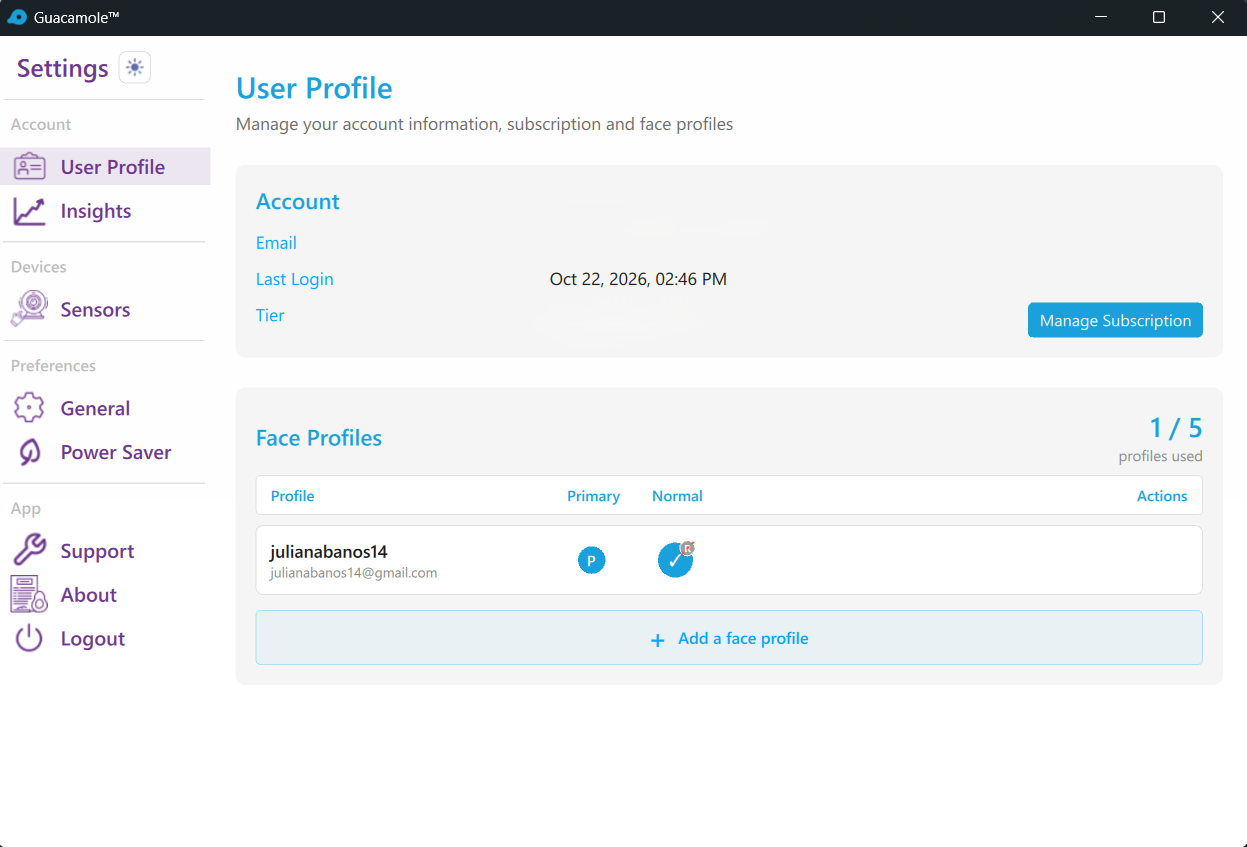
Understanding Face Profiles
Face Profiles are the core of Guacamole's biometric authentication. Each profile stores your facial biometric data, allowing the application to recognize you and grant access to your computer. You can create multiple profiles for other users of the device.
A Face Profile contains:
- Display Name: A friendly name to identify the profile (e.g., "Office Lighting", "Home Setup")
- Biometric Embeddings: Mathematical representations of your facial features
- Primary Flag: Whether this is your default profile
Profile Limits
The number of profiles you can create depends on your subscription tier:
| Tier | Maximum Profiles |
|---|---|
| Free | 1 profile |
| Pro | 5 profiles |
| Enterprise | Unlimited |
Troubleshooting
Profile Not Recognizing Me
- Ensure adequate lighting matches your profile type
- Check that the camera lens is clean
- Verify the profile is active and set as primary
Too Many Failed Recognitions
- The lighting conditions may have changed significantly
Cannot Create New Profile
- Check your subscription tier for profile limits
- Ensure you have a working camera selected
- Verify camera permissions are granted to Guacamole