Get Started
What is Guacamole™ ?
Guacamole™ is an application that utilizes facial recognition technology to enhance your computer's security. It automatically locks your screen whenever you step away, preventing unauthorized access and safeguarding your confidential information. With the Pro Version, you also have the ability to use synchronize you biometric data across multiple devices.
System Requirements
The minimum requirements are a computer or a laptop with at least:
- Operating System: Windows 10 or 11
- RAM: Minimum 8 GB
- Processor: Eighth-generation Intel Core i5 or equivalent
- Storage: 1GB
- Webcam: Required
- User Account: Administrator access for installation
Download and Installation
- Download the Guacamole™ installer from the official website.
- Locate the downloaded installer in your Downloads folder and double-click it to initiate the installation.
- Grant administrator access by clicking "Yes" in the Windows pop-up window.
- Read and accept the license agreement.
- Click "Install" to proceed with the installation.
- The installer will prompt you to restart your device. Once restarted, Guacamole™ should automatically run.
Initial Setup
- Double-click the Guacamole™ icon on your desktop to launch the application.
- Read and accept the user agreement.
- Ensure no other applications are using your computer's webcam.
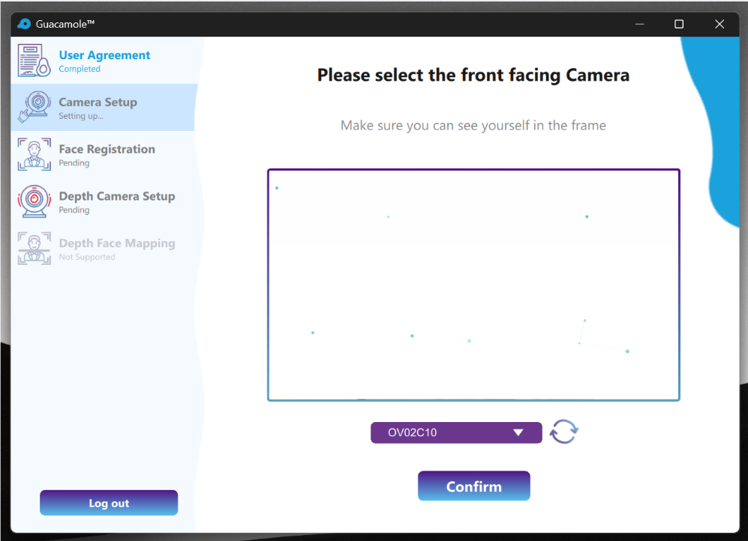
- Select your preferred camera from the available camera list.
- Follow the Face Registration process. Center your face and look straight at the camera.
Quick Menu
The main menu on the left-hand side of the screen provides access to Guacamole's different functions.
| Icon | Action | Description |
 |
Exit |
Closes the Guacamole™ application entirely.. |
 |
Pause/Play |
Starts or pauses the facial recognition system. |
 |
Shoulder Surfing Protection | Enables or disables onlooker detection to notify you if there are any unauthorized viewers. |
 |
Settings |
Opens the configuration panel with access to general settings. |
 |
System Tray | Hides the menu; Guacamole keeps running |
Block Screen
Guacamole™ is designed to block access to a device if it detects that its user walks away, or if it detects an intruder is trying to access the device. When Guacamole™ blocks your screen it displays a window (called the Block Screen) that covers all other applications. The Block Screen also detects key presses to send the device to the Windows lock screen as a security measure.